
In today’s fast-paced digital world, QR codes have become a bridge between physical and digital experiences. Whether on packaging, event flyers, business cards, or menus, QR codes let users jump instantly to web links, contact info, WiFi credentials, and more — all with a simple scan.
HiFiToolkit, with its suite of free online tools, offers a QR Code generator that stands out for its simplicity, flexibility, and no-frills ease of use. Let’s explore what makes it useful, how it works, and tips to make the most of it.
What the Tool Offers
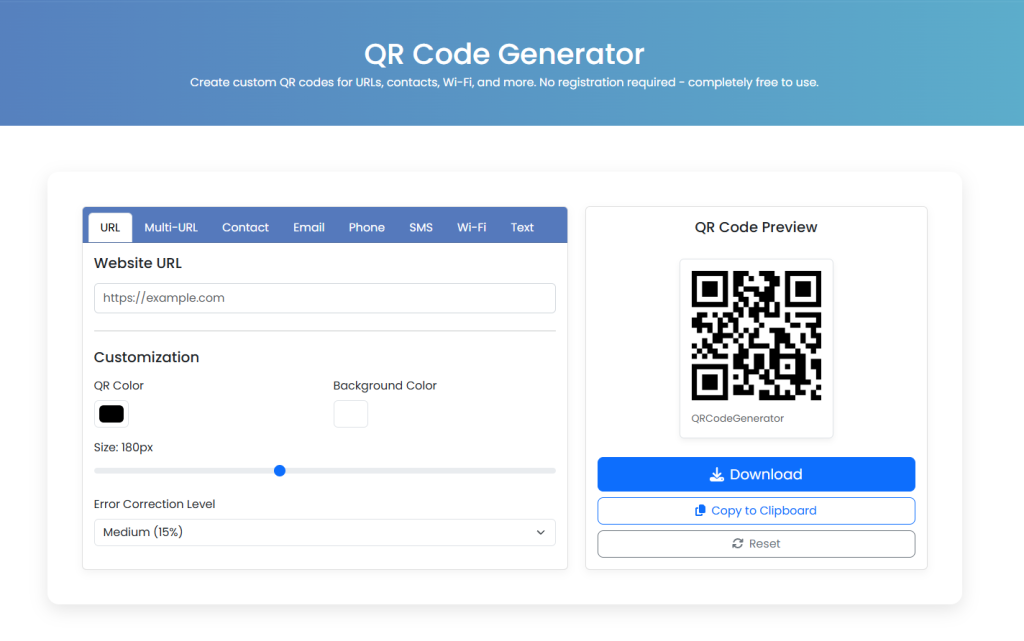
From the HiFiToolkit QR Code Generator page, here are its key features and offerings: hifitoolkit.com
Multiple Data Types Supported
You’re not limited to URLs — you can encode:
- Website URL
- Multiple URLs in one QR
- Contact (vCard or similar)
- Phone number
- SMS
- WiFi credentials
- Plain text
This gives flexibility for different use cases. hifitoolkit.com
Customization Options
- You can pick QR (foreground) color and background color hifitoolkit.com
- You can set size of the QR (e.g., default ~180 px) hifitoolkit.com
- Adjust error correction level (Low, Medium, Quartile, High) — which determines how much “damage” or distortion the QR can tolerate and still be scannable. hifitoolkit.com
Instant Preview & Download
Once configured, you see a preview of the QR code and can download it (PNG or image format) or copy it to clipboard. hifitoolkit.com
No Registration, Free, No Expiry
A major plus: you don’t need to sign up or register. The tool is completely free and the generated QR codes (static ones) don’t expire as long as the underlying content remains valid. hifitoolkit.com
FAQ and Guidance
The page includes an FAQ section covering:
- What a QR Code Generator is
- Use cases for QR codes
- Customization abilities
- Whether QR codes expire
- Whether QR codes can be scanned by all smartphones
- Download options
- Etc. hifitoolkit.com
HiFiToolkit also situates the QR tool among its wider set of free tools (developer tools, calculators, converters, etc.) as part of a larger productivity toolkit.
Why It’s Useful & Who It’s For
Here are the advantages and ideal user profiles:
Advantages
- Zero friction — no sign-ups, no paywalls, no hidden catches. You arrive, generate QR, download.
- Versatility — supports multiple data formats (URLs, contacts, WiFi, etc.), making it useful across personal, business, event, or marketing needs.
- Basic customization that suffices for many everyday uses (color, size, error correction).
- Reliability — static QR codes don’t expire.
- Accessibility — because it’s free and simple, even non-tech users can use it effectively.
Ideal Users
- Small businesses and entrepreneurs needing to generate QR codes for products, menus, flyers, or promotional materials.
- Event organizers who want to share event links, tickets, or contact info via QR.
- Restaurants / cafés that prefer to embed menu links or WiFi credentials in QR codes.
- Freelancers / consultants who want to share contact (vCard) or portfolio links on business cards.
- Educators / students who may want to embed links / data in printed materials.
- Developers / designers looking for a quick, no-hassle QR tool as part of a broader toolkit (given HiFiToolkit is a “toolkit” site).
Tips & Best Practices
To get the most out of generating and using QR codes via this tool (or similar ones), keep these in mind:
Keep high contrast
Use a dark foreground (QR) color and a light background. Avoid color combinations that are too close, which may reduce scan reliability.
Mind the size / resolution
For printed materials, ensure the QR is big enough to be scanned from some distance. Consider output in a high resolution (or vector) if possible.
Use higher error correction if adding logos or in noisy background
If you plan to overlay a logo or expect parts of the code might get obscured (scratches, folds), using a higher error correction (e.g. High/30%) helps maintain scannability.
Test, test, test
Before printing or publishing, scan with multiple devices (different brands, cameras, QR apps). Verify it redirects correctly, all data appears right, and it works in various lighting.
Static vs. dynamic QR
The HiFiToolkit QR generator appears to produce static QR codes (i.e. once encoded, the content is fixed). You cannot later change where the QR points without generating a new QR.
If you want flexibility — for example, change a campaign’s landing page later — dynamic QR codes (where the QR points to a redirector URL you can update) are better. (Many QR platforms provide dynamic QR + analytics)
(This distinction is common in QR services. See e.g. discussion of static vs dynamic in QR generator comparisons)
Use appropriate formats
For web/digital use, PNG is fine. For print, vector formats (SVG, PDF) are ideal to avoid pixelation. If the tool supports only raster formats, use a high resolution version.
Don’t overload the QR
As you encode more data (especially long text, large vCard data, etc.), the QR becomes more complex (denser) and harder to scan. For heavy content, break into link → QR, or simplify as possible.
Provide user cues
When placing the QR somewhere, add short instructions like “Scan me for menu” or “Scan to visit website” so users know what to expect.
Potential Limitations & Suggestions
While the HiFiToolkit tool is very handy, a few limitations are natural in free/basic QR tools — and knowing them helps users choose when to upgrade or shift to a more advanced solution:
- No analytics / scan tracking
Since static QR codes don’t route through a tracking system, you can’t see how many times it was scanned, location, device type, etc. - Inflexibility
If you realize you need to change the destination after printing, a static QR cannot be updated — you’d need to re-generate and reprint. - Limited visual design features
More advanced QR platforms let you use custom shapes, gradients, logo embedding, frames, dynamic landing pages; basic tools may lack these extras. - Potential usability in certain print contexts
If the print quality is low or color printing is off, QR codes may fail scanning — so ensure high print quality and contrast. - Lack of bulk generation or automation
If you need dozens or hundreds of QR codes (for large campaigns), a free single-QR tool might be inefficient.
If HiFiToolkit (or you) wanted to enhance it, ideas include adding a “dynamic QR” option (redirectable link), analytics dashboard, ability to generate in vector (SVG/PDF) formats, batch QR generation, or adding logo/branding options.
