
The Ultimate Developer’s Shortcut: The Power of Cheat Sheets vs. “Just Google It”
Every developer experiences it at some point. You are working on something tricky—possibly debugging an odd race condition or configuring a React hook—and you find yourself completely stuck. “Does ‘git reset –hard’ remove untracked files?” or “What does ‘array.reduce()’ do?”
Your immediate thought is to pull up a new browser window and begin searching. But wouldn’t it be nice if you got your answer in 3 seconds rather than 3 minutes?
This is precisely the reason why Developer Cheat Sheets at HiFi Toolkit was created.
The “Context Switching” Tax
It has to be said: Looking up syntax disrupts your train of thought. You exit your editor, head to StackOverflow, ignore five ads, and all of a sudden you’re watching a tutorial on an unrelated topic. Psychologists refer to this as “context switching,” but software engineers just call it annoying.
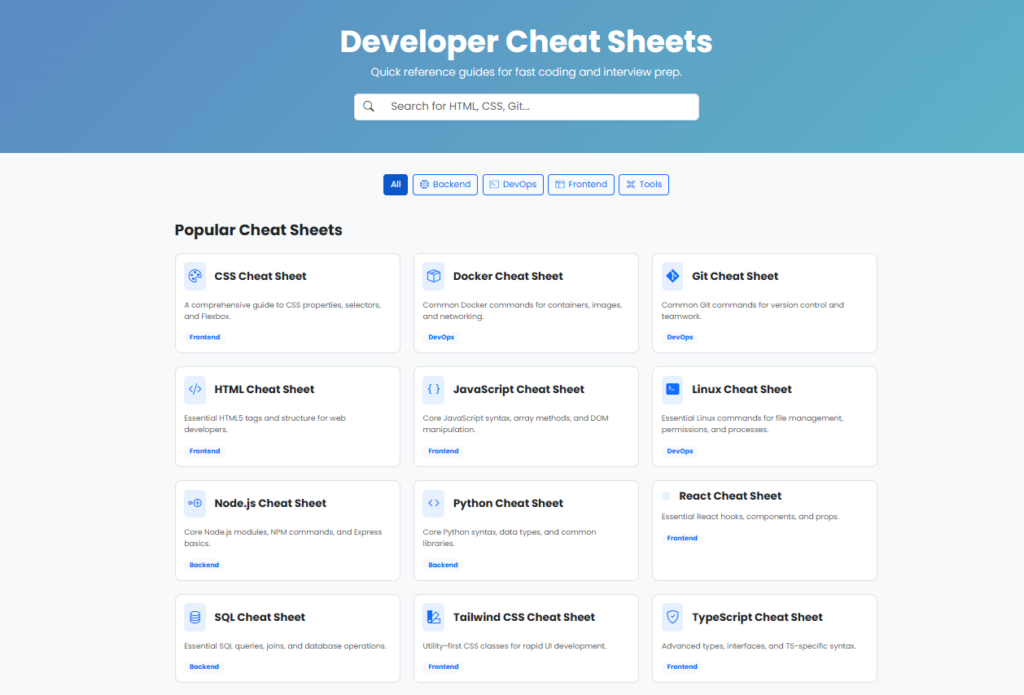
Cheat sheets remedy that problem by providing you with one definitive resource. Rather than going through your manuals, you simply check out your cheatsheet in PDF form or on a specific page. The HiFi Toolkit set has been categorized into four different stacks: Frontend, Backend, DevOps, and Tools.
What’s Inside the HiFi Toolkit?
Page has something for everyone, whether you’re an interview-preparing newbie developer or someone who just needs a simple reference. Here is a list of the most influential sheets from among the top 10:
1. Three Pillars of Version Control (Git)
Git is the everyday tool for you as a developer, yet how many times have you searched “how to undo a Git commit”? The Git Sheet has commands for managing version control and collaboration, including staging, branching, merging, and invaluable reflog commands.
2. Frontend Essentials (CSS, HTML, React)
CSS Cheat Sheet: Your complete guide to understanding properties, selectors, and Flexbox. Stop wondering why justify-content doesn’t work.
React Cheat Sheet: Learn all about the hooks (useState, useEffect), components, and props you need. Ideal for quick UI construction.
Tailwind CSS: Get your hands on the utility-first framework that’s here to stay. Everything you need for quick UI creation.
3. Backend & Databases (Python, Node, SQL)
Python Reference: Essentials of Python syntax, data types, and libraries (os, sys, json, etc.).
Node.js Reference: Basics of Node.js including core modules, NPM usage, and Express framework. Very helpful for API creation.
SQL Reference: Basic SQL queries, INNER, LEFT, and RIGHT JOINS. Print this out and pin on your wall.
4. DevOps & The Terminal (Docker & Linux)
Assuming you are developing in the cloud, here are the two that you require:
Docker Cheat Sheet: Useful Docker commands for managing your containers, images, volumes, and networking needs. No more guessing when typing docker ps -a.
Linux Cheat Sheet: Commands required for dealing with files, chmod 755 permissions, and process checking (ps aux | grep).
How to Use These for Interview Prep
Interviews on coding require less rote learning and more application, but you must be able to recall syntax efficiently.
The Whiteboard Problem: Memorize JavaScript Array methods (map, filter, reduce) and DOM manipulation using the JavaScript Cheat Sheet. Be able to recite all of these without pausing, and you will ace the technical interview.
System Design: Memorize deployment environments using the Docker Cheat Sheet and the Linux Cheat Sheet.
Language Fluency: Look at the TypeScript Cheat Sheet (advanced types, interfaces), and the Python Cheat Sheet the day before an interview.
Pro Tip: Don’t Just Read—Customize
In fact, the most involved users customize the sheets instead of just downloading them. For example, let’s consider the SQL Cheat Sheet. Make your own notes next to the “Joins” block with the particular names of the tables you currently work with.
Here is the 3-step engagement process:
Access the Cheat Sheets page.
Choose three sheets relevant to your ongoing sprint (e.g., Git, React, Docker).
Print them or save them in a “Dev_Swift” folder on your desktop.
Final Thoughts
With today’s AI coding assistants, you can wonder: Do I still need cheat sheets?
Absolutely. While AI excels at helping create logic, it does not help with memory. Cheat sheets make sure that you know everything by heart and serve as your “second brain.”
Do not break your workflow. If you want to ace your FAANG interview or push that feature before 5 PM, make sure you use our Developer Cheat Sheets.
Here they are: https://www.hifitoolkit.com/cheatsheets/


