
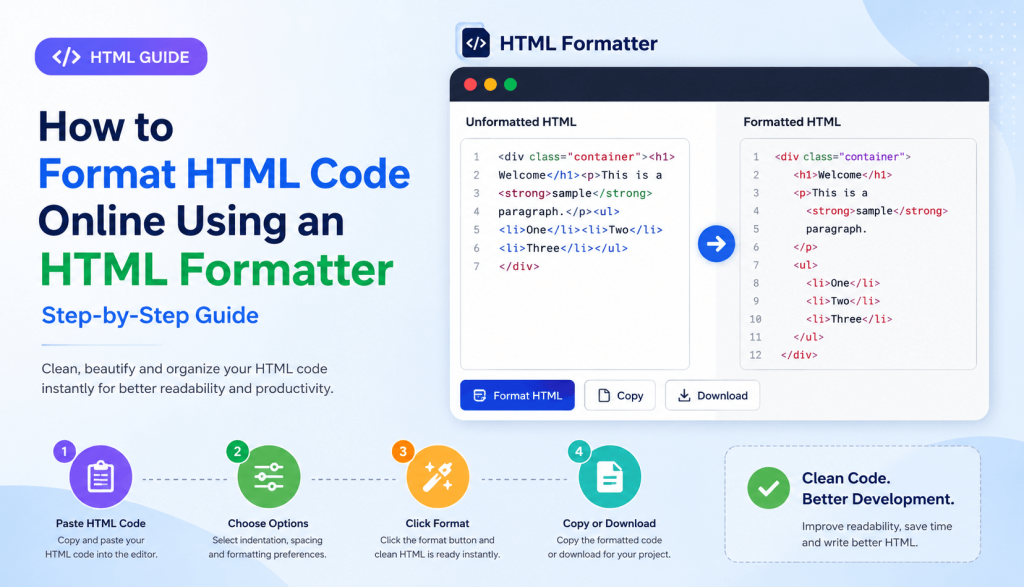
Coding HTML is the first step in designing any website, web application, and even email templates. With time, HTML code tends to become messy because of inconsistent indents, nested codes, pasted codes, and minimized codes. Therefore, it is important to have a clean and well-formatted HTML for better readability, easier debugging, and better collaboration.
HTML Formatter is an effective tool that enables programmers to format their messy HTML and make it look neat with proper indents and spaces. Regardless of what project you are working on whether it’s a landing page, an existing website, or code that you received from other programmer, formatting HTML becomes easier and more efficient.
HiFi Toolkit HTML Formatter is a free online service that makes HTML code look neat by beautifying it in just one click without altering its structure and functionality.
What Is an HTML Formatter?
HTML Formatter refers to an online tool that automatically rearranges the HTML codes in an organized and standardized manner. This means that you do not have to manually correct indentations, line breaks, and tag nesting because it will be done automatically using formatting tools.
It does not alter the functionality of your HTML. All that it does is format the source code so that it becomes easy to read, edit, and maintain.
If you have HTML codes that are compressed, minified, or poorly indented, this tool will format them for readability.
Why HTML Formatting Matters
Formatting is generally overlooked by many developers. Although there are no restrictions on the formatting in the browser while rendering HTML codes, developers spend much more time reading and editing the code than writing it.
Formatting helps in various ways such as:
- Makes the code easy to read
- Makes it easy to comprehend the nested elements
- Eases debugging
- Prevents development mistakes
- Facilitates collaboration among team members
- Favors future maintenance of the code
- Organizes the entire project
If more than one developer works on the same project, the process of formatting helps to make them all adhere to the same format.
Key Features of the HiFi Toolkit HTML Formatter
Our HTML Formatter is for developers, designers, students, and other technical personnel.
Instantly Format HTML Code
Convert messy HTML into well-formatted HTML with proper indentation within just one click.
Automatic Indentation
Indentation of the nested HTML tags automatically is done using spaces.
HTML Formatting Online
There is no need to install any software because HTML formatting is done online in the browser.
Quick Processing
Big files are formatted in seconds without delays.
Completely Free
The HTML formatter tool is available for free.
Safe to Use
All your HTML code will be formatted securely inside your browser session.
Option to Copy & Download
You can easily copy or download the HTML code after formatting it.
How to Use the HTML Formatter
To format HTML using the HiFi Toolkit, there are just a few easy steps that you need to take.
Step 1: Input Your HTML Code
Simply copy your HTML code and paste it into the editor.
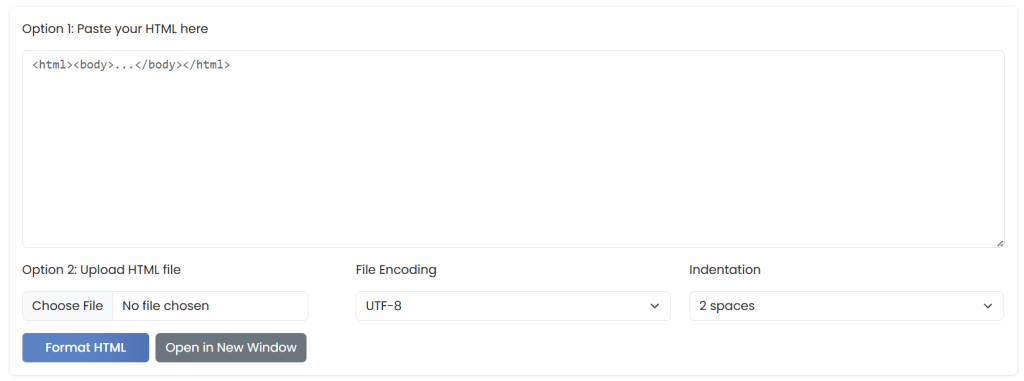
Step 2: Set Your Formatting Settings
Set your indentation preferences, spacing preferences, or other formatting options if you wish.
Step 3: Press “Format HTML”
Your HTML code is immediately reformatted.
Step 4: Copy or Download
Either copy your formatted HTML or download it for use in your project.
Benefits of Clean HTML Code
Well-structured HTML offers benefits that are long-lasting throughout the entire software development cycle.
Easy Maintenance
The next updates become much easier if HTML is organized well.
Easy Debugging
Identifying problems, such as missing tags or incorrectly nested HTML elements, becomes much easier in code that is well-formatted.
Improved Collaboration
Collaborating on a project is easy if the formatting style is consistent.
Improved Learning Experience
HTML students will benefit from properly indented examples to study document structure.
Saved Development Time
It saves developers’ time because they do not need to look through disorganized code.
HTML Formatter vs HTML Minifier
The two tools are frequently mistaken to be the same, however, these are totally different from each other.
| HTML Formatter | HTML Minifier |
|---|---|
| Makes HTML readable | Makes HTML smaller |
| Adds indentation | Removes whitespace |
| Improves maintainability | Improves loading speed |
| Best for development | Best for production |
| Easier debugging | Better performance |
In the process of development, you should use HTML Formatter, while HTML Minifier is used at the time of deployment of website.
Common HTML Formatting Mistakes
The developers often face several problems which affect the readability of the code.
Examples of such mistakes are:
- Non-uniform indentation
- Incomplete closing of elements
- Incorrect nesting of elements
- Use of excess line breaks
- Mixing of tab characters and spaces
- Excessive use of formatting on inline level
- Poor structure of the document
- Random spacing between attributes
Usage of an autoformatter can immediately get rid of all those problems.
Best Practices for Writing Clean HTML
Even when using a formatter, following good HTML practices improves overall code quality.
Use Semantic HTML
Choose elements such as:
<header><main><section><article><footer>
instead of relying entirely on generic <div> elements.
Maintain Consistent Indentation
Always use either two, four, or tab spaces.
Organize Related Items
Organize related items together.
Delete Unnecessary Code
Get rid of any unnecessary comments, duplicates, or unnecessary markup.
Validate HTML
Use a validating tool to check whether your HTML file meets HTML standards.
Use Meaningful Comments
Add comments where necessary without overcommenting.
Who Should Use an HTML Formatter?
This tool is essential for all HTML users.
Front-End Developers
Keep things clean when designing responsive sites.
UI/UX Developers
Organize HTML designs prior to CSS and JS.
Web Designers
Make HTML easier to read during landing page design.
Students
Easily learn HTML as part of web development.
Freelancers
Produce high-quality HTML code for clients.
Agencies
Ensure coding consistency among projects and developers.
Real-World Use Cases
There are many applications where the HTML Formatter can come in handy.
- When formatting HTML copied from online resources.
- For beautification of minified HTML files.
- To clean generated HTML code from CMS systems.
- Organizing email templates.
- Preparing HTML code for review.
- Editing WordPress templates.
- Analyzing AI-generated HTML code.
- Learning HTML coding with examples.
It doesn’t matter how big the project is, formatting your HTML will make you more productive.
Why Choose HiFi Toolkit HTML Formatter?
Although there are several HTML formatters that can be found online, HiFi Toolkit is dedicated to quick and simple usage.
HTML formatter includes such features as:
- Instant formatting
- Easy-to-use interface
- Clean code output
- Unlimited free usage
- Does not require installation
- Browser compatibility
- Security
- Speed
It doesn’t matter if you format just some lines of HTML or the whole page; our tool will help you generate clean and professional code fast.
Conclusion
An HTML file that follows proper format is easy to read, troubleshoot, maintain, and work on collaboratively. Save the time you could have spent trying to correct indentation and other issues by letting the HiFi Toolkit HTML Formatter format your HTML code for you.
If you are new to HTML programming, a front-end developer creating web applications, or an experienced engineer working on enterprise projects, an HTML Formatter will come in handy. Take advantage of the tool to create cleaner and developer-friendly code right now.

