Git Tutorial
- Curriculum Overview
- 1. Introduction to Git & VCS
- 2. Installation & Configuration
- 3. Git Architecture & Concepts
- 4. Basic Workflow (add/commit)
- 5. Git Log & History
- 6. Branching Basics
- 7. Merging & Conflict Resolution
- 8. Git Rebasing
- 9. Undoing Changes
- 10. Working with Remotes
- 11. Git Stashing
- 12. Git Tagging
- 13. Git Ignore & Attributes
- 14. Advanced Git Tools
- 15. Best Practices & Workflows
3. Git Architecture & Core Concepts
To master Git, it is crucial to understand how it thinks under the hood. Unlike many other version control systems that record changes file-by-file, Git stores its data as a series of snapshots. In this chapter, we will study Git's three-stage architecture and its internal object database.
The Three States / Areas of Git
Git has three main states that your project files can reside in:Working Directory, Staging Area (Index), and Git Directory (Repository).
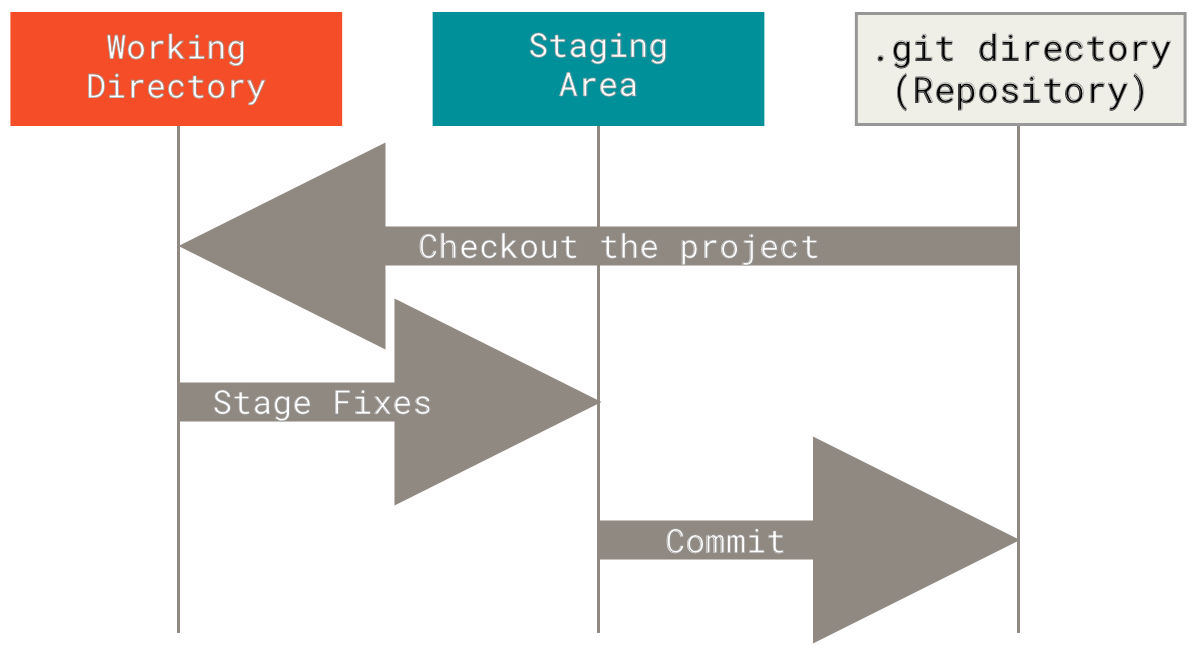
1. The Working Directory
This is the folder on your computer's filesystem containing your actual code files. You can open these files in your text editor, modify them, add new files, or delete them. These files are simply normal OS files waiting to be processed by Git.
2. The Staging Area (Index)
The Staging Area is a simple, invisible binary file located in your .git directory that stores information about what will go into your next commit. Think of it as a **preparation zone** or a draft area. You decide exactly which modifications to include here before taking a permanent snapshot.
3. The Git Directory (Repository)
This is where Git stores all metadata and the object database for your project. This is the heart of Git. When you clone a repository from a server, this is what is copied to your computer. Everything in this directory is stored inside the hidden .git folder at the root of your project.
The Basic Git Lifecycle
The standard workflow follows these simple steps:
- You modify files in your Working Directory.
- You stage these changes (
git add), adding snapshots of them to your Staging Area. - You commit the staged changes (
git commit), which stores the snapshots permanently in your Git Directory.
Git Internals: The 4 Core Objects
Git is essentially a simple content-addressable key-value database. When you save files in Git, it compresses the contents and stores them under a unique cryptographic key called a SHA-1 Hash (a 40-character hexadecimal string). Git uses four primary object types in its database:
| Object Type | Description |
|---|---|
| Blob (Binary Large Object) | Stores only the raw file contents (code, text, or binary). It does not store file metadata like the filename, path, or permissions. |
| Tree | Represents a directory directory. It groups individual Blobs and other Trees together. It stores filenames, file permissions, and maps them to their respective SHA-1 hashes. |
| Commit | Points to a top-level Tree object (representing the project snapshot), and stores author information, committer information, timestamp, commit message, and pointers to its parent commit(s). |
| Tag | A permanent reference pointing to a specific commit, usually containing a version number, tagger details, and message. |
SHA-1 Hashing: Data Integrity
Git references everything by a hash value. A SHA-1 hash looks like this:
2a8b9f1d07c4e512410a8d6e326e03ea089c9e54Because the hash is calculated directly from the file contents and directory structures, it is cryptographically impossible to change a file or a commit's content without Git knowing about it immediately. This makes Git incredibly secure against file corruption and malicious history manipulation.
Explore Related Tools
Hand-picked utilities and calculators related to this tool.

